Macros System
Overview
Access your macros by pressing the R key. Macros enable you to create and execute predefined sequences of actions.
Warning
Do not automate the macros with coins/physical objects or other software, it can lead to a ban.
Supported Content:
- All slash (
/) commands - All chat symbols and commands
Substitutions by name
| Variable | Description |
|---|---|
%target |
Displays name of current target |
%self |
Displays your character's name |
%pet |
Displays your pet's name |
%party1-%party8 |
Displays party member names (slots 1-8) |
Macro Commands
Delay Command:
/delay [time_in_seconds]
- Pauses macro execution for specified duration
- Example:
/delay 2waits 2 seconds
Character Actions:
/sit- Sit down/stand- Stand up/sitstand- Toggle sitting/standing
Tip: Drag action icons directly into the macro editor instead of typing commands.
Channel Prefixes
-
Prefix Channel #Party chat @Clan chat $Alliance chat !Area chat +Buy/Sell chat
(not really used on Reborn)Example: !WTS Arcana Mace 250m -
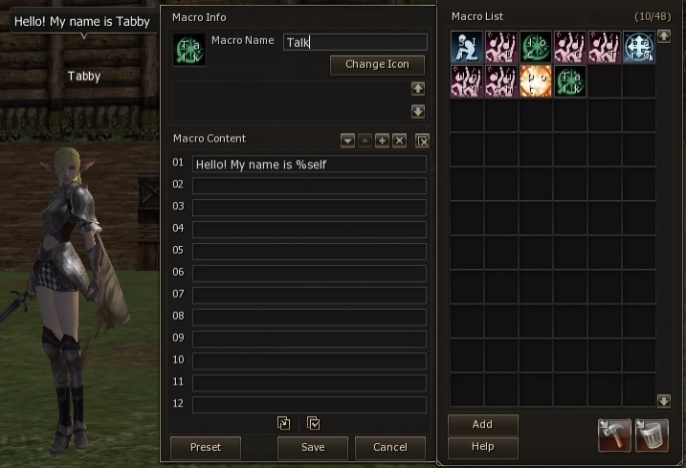
Macro Menu using %selfsubstitution
Shortcut Commands
Regular Shortcut:
/useshortcut [container] [slot]
- Example:
/useshortcut 1 3uses slot 3 in container 1
Forced Shortcut:
/useshortcutforce [container] [slot]
- Equivalent to Ctrl+Click on the shortcut
Skill Commands
Regular Skill Use:
/useskill [skillName]
- Example:
/useskill Windstrike
Forced Skill Use:
/useskillforce [skillName]
- Equivalent to Ctrl+Click on the skill