Augmenting
-
Auto Augmenting
-
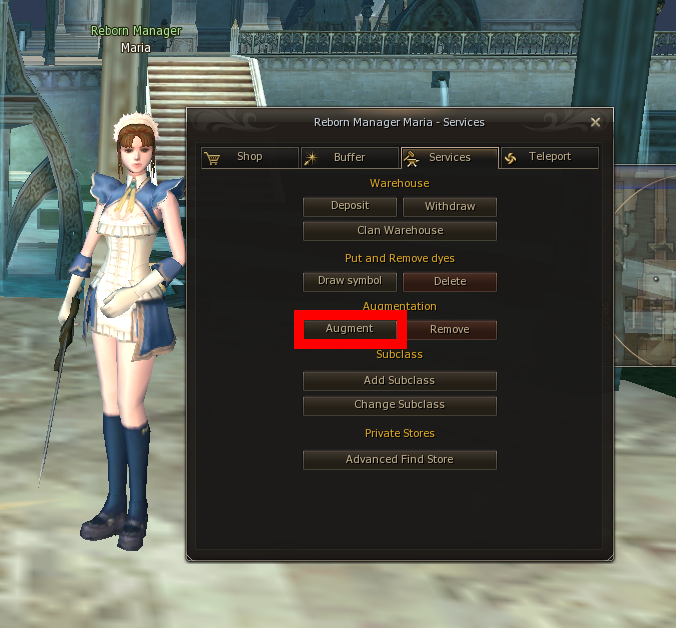
Go to Maria -> Services -> Augment
-
Have the appropriate level according to your Life Stone
-
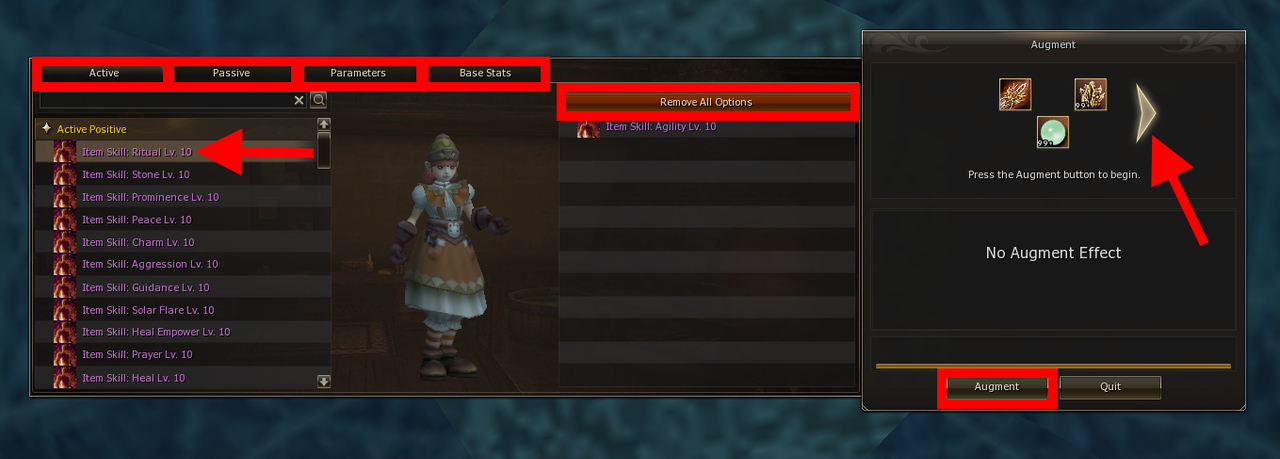
Put in the items and click the big arrow on the right.
-
Select the augments you want and Press "Augment" to start the automatic Augment Process.
-
-
How to Access It
Quick Augmenting
- Click the Life Stone or put the Life Stone on your hotbar to quickly augment your weapon without filtering system.
Basics
- Eligible Weapons: C-grade (needs Gemstone D) | B-grade (needs Gemstone D) | A/S-grade (needs Gemstone C)
- Materials needed: Weapon + Life Stone (monster drops, better from raids) + Gemstones
Bonus Types
- Stats: They can be: STR/CON/INT/MEN, P.Atk/P.Def/etc.
- Skills: Passive (always on) | Active (usable) | Chance (random proc)
- Wild Magic Example
- You can search for Augments when you type
Item Skill:
Important Notes
- Grades: The grades don't have extra chance to give passive/active/chance skills. It's mainly for better stats.
- Normal, Mid, High, Top Life Stones have the same chance, they do not grant any extra chances for getting skills
- Chances of getting skills: Chance of getting skills are skill dependant between: 0.5% - 1.5%
- It means that getting a specific Active or Passive is not dependant on Life Stone Grades.
- Restrictions: No drop/trade/sell/freight/clan storage (private OK), augment is removable
- Other: Compatible with enchants, high-grade glows, adds name prefix
- You can still put SA on weapons AFTER putting AUGMENTS, just click "EXCHANGE"